









Chaque image de votre site web contribue soit à votre référencement naturel, soit, discrètement, à son détriment.
La vitesse de chargement des pages est un facteur de classement Google confirmé, et les images représentent systématiquement la part la plus importante du poids d'une page. Choisir un format inadapté pour un site web de 50 pages, c'est alourdir inutilement le temps de chargement de chaque page, pénaliser vos scores Core Web Vitals et offrir un avantage concurrentiel indéniable.
En 2026, les spécialistes du marketing numérique ne pourront plus se permettre d'utiliser systématiquement les formats JPG ou PNG. Le format WebP est désormais pris en charge par la quasi-totalité des navigateurs, Google le recommande activement, et l'écart de performance entre les formats n'a jamais été aussi important pour le référencement naturel.
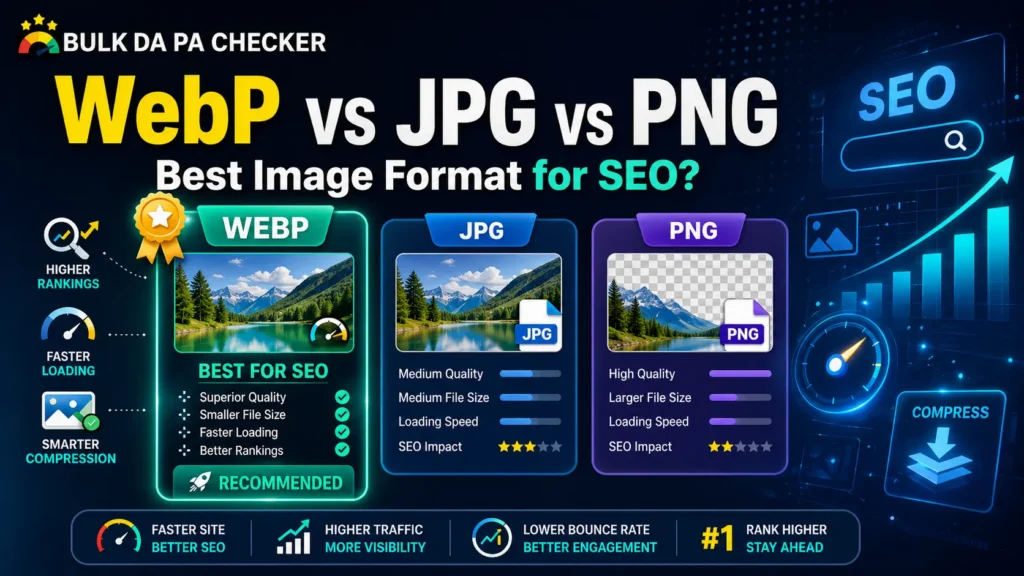
WebP est le meilleur format d'image Pour la plupart des sites web en 2026, WebP offre des fichiers plus légers que JPG et PNG tout en garantissant une qualité visuelle comparable. Résultat : des pages plus rapides à charger, un meilleur score Web Vitals et un référencement naturel optimisé. JPG reste le format de prédilection pour les photos non prises en charge par WebP, tandis que PNG est idéal pour les images nécessitant de la transparence ou une qualité sans perte. Dans la plupart des cas, WebP s'impose nettement.
Comprendre les trois formats
Réponse rapide : Le format JPG (ou JPEG) est un format de compression avec perte, idéal pour les photographies et les images complexes comportant de nombreuses couleurs. Le format PNG est un format sans perte qui préserve la qualité d'image et prend en charge la transparence, ce qui le rend idéal pour les logos, les icônes et les graphiques contenant du texte. Le format WebP est un format moderne développé par Google qui prend en charge la compression avec et sans perte, offrant des fichiers plus légers que les formats JPG et PNG tout en conservant une qualité visuelle comparable. Il représente ainsi l'option la plus polyvalente et optimisée pour le référencement naturel (SEO) pour une utilisation web en 2026.
JPG (JPEG)
Introduit en 1992, le format JPG est devenu le format d'image par défaut du Web pour les photographies. Il utilise compression avec perte Cela signifie que certaines données d'image sont définitivement supprimées lors de la compression afin de réduire la taille du fichier. Il en résulte des fichiers plus petits, mais avec une perte de qualité visible aux niveaux de compression élevés.
Idéal pour : Photographies, images de produits, dégradés de couleurs complexes. Pas idéal pour : Images contenant du texte, des logos, nécessitant de la transparence ou des modifications répétées
PNG
PNG utilise compression sans perte — Aucune donnée n'est perdue lors de la compression, la qualité d'image est donc parfaitement préservée. Il prend également en charge transparence alphaCe format est donc devenu le choix standard pour les logos, les icônes et les éléments d'interface utilisateur. En contrepartie, la taille des fichiers est nettement plus importante qu'avec les formats JPG et WebP.
Idéal pour : Logos, icônes, captures d'écran, graphiques avec texte et images nécessitant de la transparence. Pas idéal pour : Les photographies ou toute image dont la taille du fichier pose un problème de performance
WebP
Développé par Google et lancé en 2010, WebP prend en charge compression avec et sans perte Avec la transparence en plus, WebP combine les atouts des formats JPG et PNG en un seul format moderne. En 2026, il était pris en charge par tous les principaux navigateurs, dont Chrome, Firefox, Safari et Edge.
Idéal pour : Presque tout : photographies, graphiques, icônes, images de produits, images de blog. Pas idéal pour : Environnements ou systèmes hérités avec une prise en charge WebP limitée (de plus en plus rares en 2026)
Taille et compression des fichiers : les chiffres clés pour le référencement naturel
Réponse rapide : Les fichiers WebP sont généralement 25 à 35 % plus légers que les fichiers JPG équivalents et jusqu'à 26 % plus légers que les fichiers PNG, à qualité visuelle comparable. Des fichiers plus légers se traduisent par des temps de chargement de page plus rapides, ce qui améliore directement les scores Core Web Vitals, notamment le score LCP (Largest Contentful Paint). Pour les sites web disposant d'importantes bibliothèques d'images, le passage du format JPG ou PNG au format WebP peut réduire le poids total de la page de 30 à 50 %, ce qui se traduit par des améliorations mesurables de l'expérience utilisateur et du référencement sur Google.
Voici comment les formats se comparent en termes de réduction réelle de la taille des fichiers :
| Format | Type de compression | Transparence | Taille moyenne des fichiers par rapport au format WebP |
|---|---|---|---|
| WebP (avec perte) | avec perte | ✅ Oui | Ligne de base |
| JPG | avec perte | ❌ Non | ~25 à 35 % plus grand |
| PNG | Sans perte | ✅ Oui | ~20 à 26 % plus grand |
| WebP (sans perte) | Sans perte | ✅ Oui | Environ 26 % plus petit que la Papouasie-Nouvelle-Guinée |
Il ne s'agit pas de différences négligeables. Sur un site e-commerce comportant 500 images de produits, le passage du format JPG au format WebP peut réduire la taille totale des fichiers image de plusieurs centaines de mégaoctets, une transformation qui influe directement sur la vitesse de chargement, le taux de rebond et le taux de conversion, ainsi que sur le référencement naturel.
Impact du référencement et des indicateurs clés de performance web
Réponse rapide : Le choix du format d'image influe directement sur les Core Web Vitals, les signaux de classement confirmés de Google mesurant la vitesse de chargement des pages et l'expérience utilisateur. La taille réduite des fichiers WebP améliore le Largest Contentful Paint (LCP), qui mesure la vitesse de chargement du contenu principal d'une page. PageSpeed Insights de Google signale activement les images JPG et PNG comme des opportunités d'optimisation et recommande de diffuser les images dans des formats de nouvelle génération tels que WebP. En 2026, l'utilisation de WebP représente l'une des meilleures stratégies de référencement technique pour les spécialistes du marketing digital.
Comment chaque format influence votre classement :
WebP :
- Améliore le LCP en réduisant le temps de chargement des images
- Réussit la recommandation « formats nouvelle génération » de Google PageSpeed Insights
- Prend en charge nativement le chargement différé
- Réduction du poids total de la page — signal positif pour l'indexation mobile-first
JPG :
- Signalé par Google PageSpeed Insights comme un format à remplacer
- Acceptable pour la photographie, mais de plus en plus obsolète pour la diffusion web.
- L'absence de prise en charge de la transparence limite la polyvalence
PNG :
- Les fichiers beaucoup plus volumineux ralentissent considérablement le chargement des pages contenant des photos.
- Néanmoins, le choix approprié pour les graphismes sans perte et les besoins de transparence reste à faire.
- Ne devrait jamais être utilisé pour les photographies dans un environnement optimisé pour les performances
Selon Documentation de Google PageSpeed InsightsL'utilisation de formats d'images de nouvelle génération comme WebP permet d'économiser un nombre important d'octets de données par image, une recommandation qui a un impact direct sur votre score Core Web Vitals et votre potentiel de référencement naturel.
Lire aussi: Comment optimiser ses images pour le référencement naturel : guide complet
Compatibilité des navigateurs en 2026
L'une des objections les plus courantes à l'adoption de WebP a toujours été la compatibilité avec les navigateurs. Cette objection est désormais obsolète.
| Navigateur | Prise en charge WebP |
|---|---|
| Google Chrome | ✅ Assistance complète |
| Mozilla Firefox | ✅ Assistance complète |
| Safari (iOS et macOS) | ✅ Prise en charge complète (depuis Safari 14) |
| Microsoft Edge | ✅ Assistance complète |
| Opéra | ✅ Assistance complète |
| Samsung Internet | ✅ Assistance complète |
Navigateur WebP global La compatibilité avec WebP dépasse désormais 97 % des internautes. Pour la quasi-totalité des sites web destinés à un public moderne, il n'existe plus d'obstacle technique à l'adoption complète de WebP.
Les seuls cas particuliers restants concernent des environnements d'entreprise anciens très spécifiques ou des systèmes embarqués plus anciens, ce qui ne s'applique pas à la grande majorité des contextes de marketing numérique.
Quand utiliser WebP, JPG et PNG : un cadre de décision
Réponse rapide : Utilisez WebP comme format par défaut pour toutes les nouvelles images de votre site web en 2026. Il gère mieux les photos, les graphiques et les images transparentes que JPG ou PNG dans la plupart des cas. Réservez le format PNG aux images exigeant une qualité sans perte dans les flux de travail de conception professionnels. Utilisez le format JPG uniquement comme solution de repli pour les systèmes anciens qui ne prennent pas en charge WebP. Pour tout site web privilégiant le référencement naturel et les indicateurs clés de performance web (Core Web Vitals), WebP doit être la norme, et non l'exception.
Utilisez WebP quand :
- Publication d'images de blog, d'images d'en-tête ou de bannières graphiques
- Optimisation des photos de produits pour le e-commerce
- Remplacement des fichiers JPG ou PNG existants lors d'un audit de performance du site
- Objectif : obtenir des scores élevés pour les Core Web Vitals et des notes Google PageSpeed élevées.
- Gestion d'images nécessitant de la transparence (remplace le PNG dans la plupart des cas)
Utilisez le format JPG lorsque :
- Diffusion d'images vers des systèmes ou plateformes anciens qui ne prennent pas en charge WebP
- Travailler dans des environnements CMS avec une prise en charge limitée des formats
- Partager des images en dehors de votre site web (clients de messagerie, certaines plateformes sociales)
Utilisez le format PNG lorsque :
- Création ou exportation de logos, d'icônes et d'éléments de marque pour une utilisation Web lorsque le format WebP n'est pas pris en charge.
- Travailler dans des flux de travail de conception professionnels exige une qualité sans perte pour les modifications répétées.
- Générer des captures d'écran avec du texte qui doit rester parfaitement net au pixel près.
Comment convertir des images en WebP
Savoir que WebP est le format supérieur est une chose. Convertir efficacement une bibliothèque d'images existante en est une autre, particulièrement pour les responsables marketing qui gèrent de grands sites web ou plusieurs propriétés de clients.
La solution la plus pratique pour les flux de travail professionnels est la conversion par lots, qui consiste à traiter plusieurs images simultanément plutôt qu'une par une. C'est précisément ce que… Convertisseur d'images WebP en masse sur bulkdapa Conçu pour cela. Téléchargez plusieurs fichiers JPG ou PNG simultanément, convertissez-les instantanément au format WebP optimisé et téléchargez les résultats ; aucune installation de logiciel ni configuration technique n’est requise.
Pour un suivi continu des performances de votre site parallèlement à votre travail d'optimisation d'images, le Outils SEO gratuits sur bulkdapa Nous vous fournissons l'autorité de domaine, le score de spam et des indicateurs de santé SEO plus généraux pour suivre comment vos améliorations techniques se traduisent par des gains de classement au fil du temps.
Erreurs courantes de formatage d'image commises par les spécialistes du marketing numérique
Même les professionnels expérimentés commettent ces erreurs de manière répétée :
- Utilisation du format PNG pour les photographies — l’erreur de taille de fichier la plus courante et la plus coûteuse sur les sites web riches en contenu
- Conserver les bibliothèques JPG existantes sans conversion — chaque image non convertie représente une opportunité PageSpeed manquée
- Ignorer le format d'image lors des chargements dans le CMS — WordPress et d'autres plateformes ne convertissent pas automatiquement au format WebP, sauf si elles sont configurées pour le faire.
- En supposant que Safari ne prenne pas en charge WebP — c’est le cas depuis Safari 14, ce qui rend cette préoccupation obsolète en 2026.
- Optimisation du format sans tenir compte des dimensions — Afficher une image de 4 000 px de large au format WebP, mais en pleine résolution, ralentit considérablement la vitesse de chargement de la page.
- Oubli de mettre à jour le texte alternatif après la conversion — La conversion de format est le moment idéal pour auditer et optimiser simultanément le texte alternatif.
FAQ :
Le format WebP est-il meilleur que le format JPG pour le référencement naturel ?
Oui, dans quasiment tous les cas d'utilisation web. WebP génère des fichiers plus légers à qualité équivalente, ce qui améliore la vitesse de chargement des pages, les scores Core Web Vitals et le classement Google PageSpeed. Google recommande explicitement WebP comme format d'image de nouvelle génération dans son outil PageSpeed Insights.
La conversion au format WebP affecte-t-elle la qualité de l'image ?
Dans la plupart des cas, la différence est imperceptible. La compression avec perte de WebP, avec des paramètres de qualité standard (75 à 85 %), produit des images visuellement indiscernables de leurs équivalents JPG, pour une taille de fichier réduite de 25 à 35 %. Pour une compression sans perte, le mode WebP sans perte préserve la qualité maximale tout en offrant une taille de fichier plus compacte que le PNG.
Puis-je utiliser le format WebP pour toutes les images de mon site web ?
Oui, avec une compatibilité mondiale avec plus de 97 % des navigateurs en 2026, WebP peut être utilisé en toute sécurité comme format par défaut pour toutes les images de votre site web. Seules certaines plateformes anciennes ou intégrations tierces qui ne prennent pas encore en charge WebP font exception.
Comment convertir des images JPG et PNG existantes au format WebP ?
Le flux de travail professionnel le plus rapide est la conversion par lots utilisant le Convertisseur d'images WebP en masse gratuit sur bulkdapa Téléchargez plusieurs fichiers simultanément, convertissez-les instantanément et téléchargez des versions WebP optimisées, prêtes pour un déploiement immédiat.
WordPress prend-il en charge les images WebP ?
Oui, WordPress prend en charge nativement les chargements WebP depuis la version 5.8. Certains environnements d'hébergement et thèmes plus anciens peuvent présenter des limitations, mais pour la plupart des installations WordPress modernes, les images WebP peuvent être chargées et servies directement sans plugins supplémentaires.